Boomerang Video Maker: The AI Guide to Cloning Viral Clips
Ditch manual editing. This AI boomerang video maker guide shows you how to clone viral trends, create faceless content, and scale your UGC workflow in minutes.
You’ve seen the pattern.
A boomerang-style clip starts moving across TikTok or Reels. It’s simple. A hand motion. A reaction. A quick dance beat. A product reveal that snaps forward and back. It looks easy, so the team assumes you can recreate it in an hour.
Then the work begins.
You trim the clip too early. The reverse looks off. The subject’s expression changes between frames. The loop catches on the seam. By the time the edit feels usable, the trend has already cooled. That’s the core problem with the classic boomerang video maker workflow. The format is short, but production friction isn’t.
The End of Manual Trend-Chasing
Monday morning. A creator ops lead drops a viral loop into Slack and asks for five versions by lunch. One editor starts trimming the source clip. Another records a remake on a phone. A third tries to fix the reverse so the motion lands cleanly. Two hours later, the timing is still off, the loop break is visible, and the post that inspired the idea has already been copied by ten other accounts.
That problem has been around since Instagram released Boomerang as a standalone app on October 20, 2015 (Snoopreport’s Boomerang app overview). The format lasted because it compresses a payoff into a second or two. A hand reveal, a head turn, a product snap, a reaction beat. No dialogue needed. If the motion reads instantly and the reset feels smooth, people watch it again.
The format still has reach outside Instagram’s original app era. Similarweb’s app rankings continue to show boomerang-style editors and loop tools holding real user demand in multiple markets. That matters for one reason. Creators still respond to short, repeatable motion formats, which means there is still value in remaking winning loops instead of treating them like a dead feature.
Why manual recreation keeps breaking
Manual recreation slows down for a specific reason. The motion in a viral boomerang is usually more precise than it looks.
A creator or social team sees a looped coffee pour, mirror outfit change, pet reaction, or before-and-after product reveal and assumes the structure is simple. Then the remake starts. The hand position changes between takes. The camera shifts a few pixels. The reverse point lands one frame late. The loop becomes watchable, but not repeatable.
That small miss hurts replay.
Short-form viewers are ruthless about motion. If they notice the cut, the clip stops feeling native to the feed. Manual tools can still work for a one-off post, but they are a poor fit for a volume workflow where the goal is to clone a format, swap the subject, and publish fast. That is why teams building faceless pages, AI influencer content, or UGC-style ad variants are moving toward remake systems instead of one-by-one edits. A clear example is an AI video cloning workflow for remaking proven short-form formats.
The better operating model is simple. Use the viral source as production input, not just inspiration. That cuts out re-filming, reduces loop errors, and gives you a repeatable way to remake trends at scale without waiting on a shoot.
Rethinking Boomerang Videos with AI Workflows
The old workflow is mechanical. Import clip. Trim. Duplicate. Reverse. Retouch the cut. Adjust speed. Export. Reopen. Fix the seam. Repeat.
That still works if you’re making one post for yourself.
It breaks when you need volume.
Existing tutorials for tools like CapCut and Videoleap often lead to “choppy loops,” and that’s a real issue because 70% of top-performing short-form videos rely on fluid motion for engagement, according to the verified Filmora reference on boomerang maker gaps and smoothing needs (Filmora’s discussion of fluid loop problems).wondershare.com/video-editor/boomerang-maker.html)).
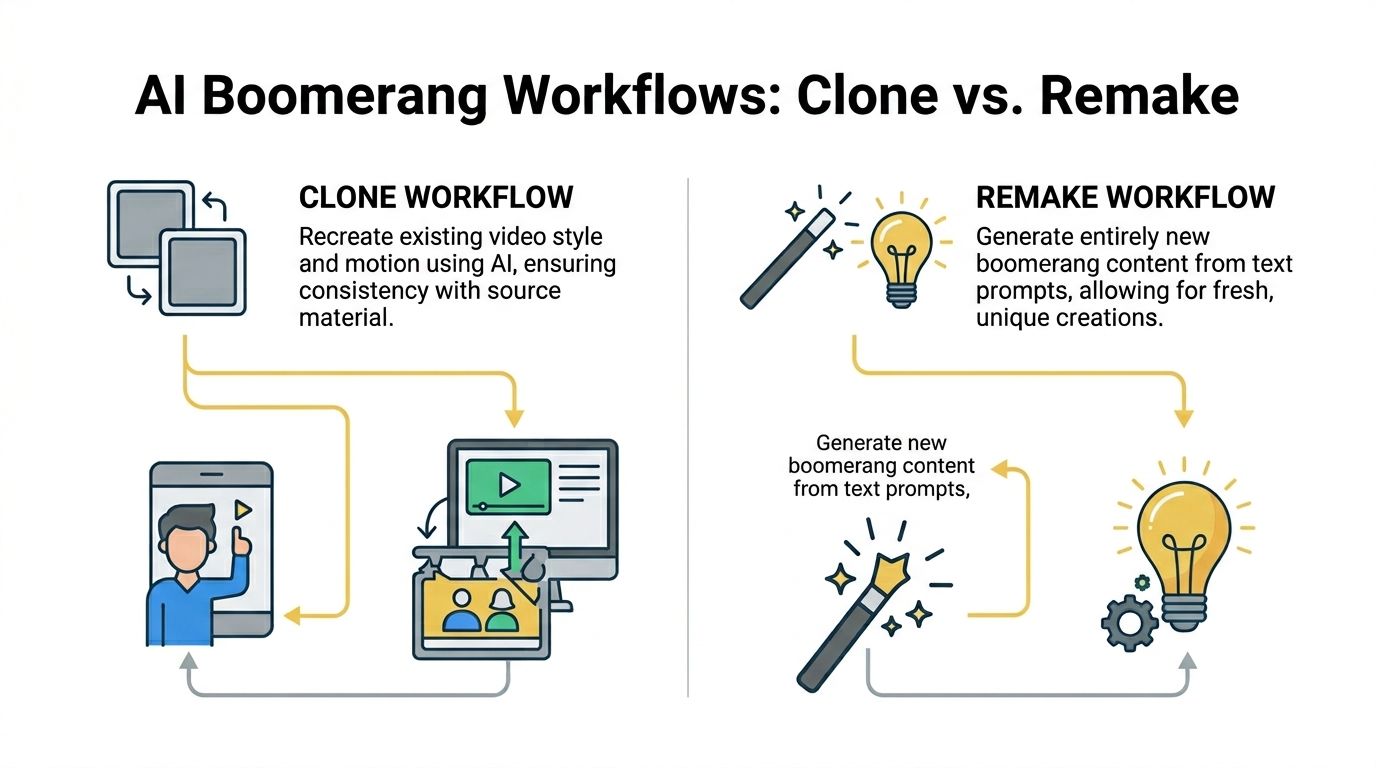
Clone workflow
Clone is the right choice when the motion pattern is the asset.
You’ve found a viral clip with the exact cadence you want. Maybe it’s a reaction loop, a gesture-based hook, or a micro-dance that already fits your niche. In a clone workflow, the goal isn’t to invent a new structure. It’s to preserve the winning rhythm while changing who appears in the video.
This is useful for:
- AI influencer creation when a brand wants a consistent on-camera identity
- UGC automation when you need multiple versions of the same proven concept
- Localized variants where the movement stays the same but the face, styling, or presentation changes
Clone works best when the reference clip has a clear subject, readable body motion, and a clean start and end action.
Remake workflow
Remake is different. You’re using the source as creative direction, not as a rigid performance template.
That’s the better option for faceless content, meme formats, niche reaction styles, and pages that don’t want the same visual identity every time. You keep the energy and structure of a trend, but you generate a fresh version that fits your account.
Use remake when:
| Goal | Better workflow |
|---|---|
| Preserve a proven performance pattern | Clone |
| Build original faceless content from a trend | Remake |
| Keep one recurring avatar consistent | Clone |
| Produce meme and reaction variants at scale | Remake |
Where AI removes the bottleneck
Manual boomerang editing demands frame-level cleanup. AI workflows remove much of that by treating the source clip as production input, not just inspiration.
That’s the practical difference. You spend less time making the loop exist and more time deciding whether the source concept is worth cloning, remaking, or discarding. If you want to see how modern link-to-video generation flows are structured, VidCloner’s workflow overview is a useful reference point.
Practical rule: If a trend depends on exact body rhythm, clone it. If it depends on format logic, remake it.
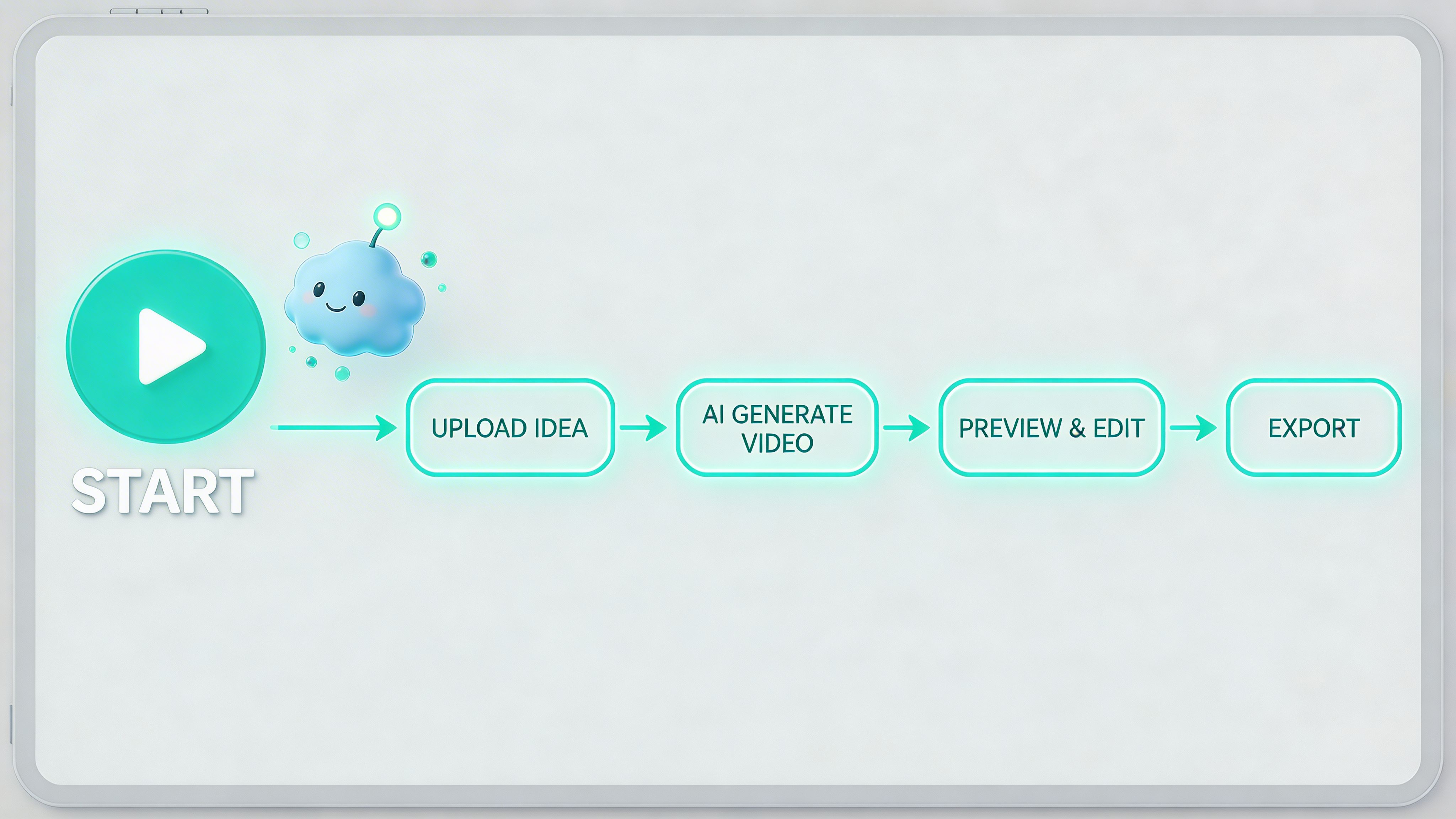
Your AI Boomerang Production Playbook
This is the working process that keeps output clean. Not perfect every time, but consistent enough to scale.
Manual editors usually start too late in the pipeline. They open the app first and think about the source video second. That’s backwards.
In a manual tool like CapCut, a polished boomerang often requires precise trimming, applying Reverse, duplicating the clip, boosting speed to 1.5x to 3x, and then fine-tuning keyframes to remove gaps (CapCut’s boomerang video maker process). AI workflows collapse much of that work, but the input still determines the output.
Start with source selection, not editing
The source clip decides whether your final loop feels smooth or fake.
Look for motion that naturally returns to a visual midpoint. Hand tosses, head turns, shoulder shrugs, hair flips, object reveals, and quick lean-ins usually translate well. Long camera moves usually don’t.
A strong source clip has these traits:
- Single clear action rather than layered movement in different directions
- Stable framing so the subject stays readable during the reverse
- Short payoff cycle because the viewer should understand the loop fast
- Distinct body language if you’re cloning a personality-driven trend
Weak source videos create extra cleanup later. If the original depends on dialogue, multiple cuts, or a complicated background interaction, the loop often feels forced after generation.
Match the avatar to the motion
Teams often overfocus on realism and underfocus on compatibility.
If the source clip uses exaggerated facial acting, your avatar needs expressions that can carry that style. If the source is more about hand movement or torso rhythm, a simpler avatar can work because the face isn’t doing all the selling.
Use this decision framework:
| Source style | Avatar priority |
|---|---|
| Reaction clip | Expressive face and eye direction |
| Dance loop | Strong body silhouette |
| Product UGC | Credible posture and hand movement |
| Meme remake | Style fit over realism |
Don’t force the same avatar into every niche. A beauty-style UGC face may look wrong in deadpan meme formats. A polished spokesperson avatar may flatten a chaotic trend.
If the source video wins because of personality, the avatar has to carry personality. If the source wins because of motion, the avatar just needs to stay believable.
Prompt for output shape, not just aesthetics
Most bad prompts describe the look and ignore the behavior.
That leads to videos that are visually fine but structurally weak. For boomerang-style outputs, prompt around repeatable action. Think in terms of movement, pacing, and loop feel.
Useful prompt elements include:
The core action Define the one thing the subject is doing. Example: quick head turn with amused reaction, then return.
The emotional tone Keep this simple. Excited, awkward, smug, playful, confused.
The platform context TikTok-style reaction, Reel-ready product loop, meme page format.
The pacing Specify whether the clip should feel snappy, floaty, awkward on purpose, or polished.
A practical prompt is better than a decorative one. “Short looping reaction with a subtle lean-in and return, playful expression, framed for TikTok” is more useful than “cinematic beautiful viral aesthetic.”
Use the first output as a test render
The first generation is for diagnosis.
Check these three things before doing anything else:
- Loop seam. Does the ending motion visually hand off into the beginning?
- Expression drift. Does the face change in a way that breaks continuity?
- Background behavior. Does anything behind the subject wobble, jump, or distract?
If one of those fails, don’t polish around it. Change the source or tighten the prompt. Teams waste time editing around a bad motion pattern that should’ve been rejected in round one.
Build a reusable review checklist
Once you’re making more than a few clips per week, subjective feedback gets messy. Use a fixed review pass.
A simple internal checklist:
- Hook clarity: Can a viewer understand the action with sound off?
- Replay feel: Does the final frame invite another watch?
- Platform fit: Does the framing work in vertical without cramped motion?
- Brand distance: Does it feel inspired by a format, not lazily copied?
- Variant potential: Can this structure produce multiple versions?
Finish with light editing, not rescue editing
AI output still benefits from cleanup. The difference is that editing should sharpen the clip, not save it.
Use post-generation edits for:
- Caption overlays that land the joke or product angle
- Music sync when the motion wants a stronger beat
- Speed adjustments if the return feels slightly slow
- Cropping to keep the subject dominant in frame
What usually doesn’t work is trying to patch a weak loop with heavy effects. Fancy text won’t hide a broken seam.
Creative Use Cases for AI-Generated Loops
The best use of a boomerang video maker isn’t novelty. It’s repeatability.
That matters because looping content still has broad global traction. In the verified market data, one boomerang app ranked #777 in India and #471 in Indonesia, which reflects strong demand in large social ecosystems where creators use loop formats for reactions and dance content (Similarweb app ranking reference).
DTC product loops
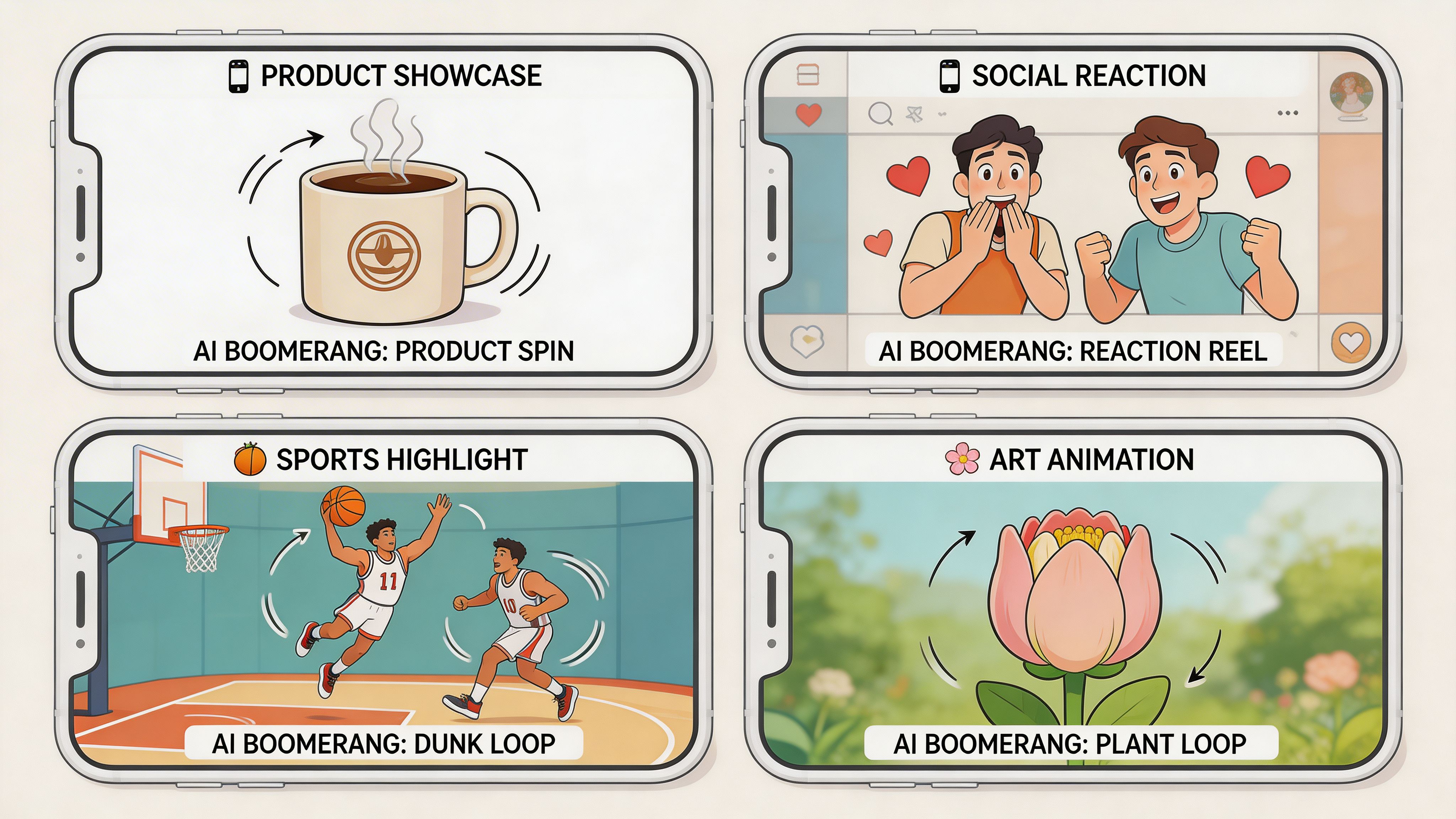
A direct-to-consumer brand doesn’t need a full shoot for every creative angle. It needs repeatable ad atoms.
A useful recipe looks like this:
- Source type: hand reveal, quick unbox motion, mirror reaction, “wait for it” product flip
- Output style: UGC-looking, vertical, casual lighting
- Best platform: TikTok and Reels
The loop works because the product is always in motion. A serum bottle turning, a snack bag opening, or a gadget snapping into place gives the viewer a clean replay cue.
App feature reactions
App marketers usually struggle to make product updates feel human. A loop solves that when you pair screen context with reaction energy.
Use a source where the subject reacts to something surprising, satisfying, or mildly obsessive. Then adapt it around a feature launch, onboarding moment, or UI change. This format works especially well when the screen result and facial reaction are tightly connected.
A clean version might show:
- a “finally” reaction after a bug fix
- a fast nod loop after a new feature appears
- a repeated impressed look tied to a speed improvement or design change
Meme page output
Meme accounts need fast volume and format awareness. They don’t need polished influencer energy every time.
That’s where remake-style looping content is strong. You can preserve a trend’s rhythm while shifting the context to a niche joke, fandom reference, or community-specific punchline. For teams exploring this route, VidCloner’s meme use case examples show the kind of faceless direction these workflows can support.
Good meme loops don’t explain the joke. They set a repeated visual beat that makes the caption hit harder.
Community and reaction pages
There’s also a middle ground between creator content and meme content. Think fan pages, sports edits, gaming commentary accounts, and micro-niche reaction channels.
Their best boomerang-style loops usually share three traits:
| Page type | Loop pattern that fits |
|---|---|
| Sports page | celebration motion, disbelief reaction |
| Gaming page | fail reaction, locked-in stare, victory gesture |
| Fandom page | character-coded expression, dramatic return motion |
| Local trend page | dance snippet, street reaction, quick visual joke |
The point isn’t to use AI everywhere. It’s to reserve filming for the formats that need fresh camera work, and use generation where motion pattern matters more than original capture.
Scaling and Optimizing Your Video Output
One good loop is useful. A repeatable output system is what changes the account.
Most creators stall because they treat each clip like a custom project. That’s manageable at low volume. It becomes a bottleneck once you’re feeding multiple accounts, testing creative angles, or publishing daily.
A common pain point is clip length. The classic boomerang format often feels trapped in tiny motion windows, but the verified data notes that the 2025 TikTok algorithm increasingly favors 7 to 15 second “infinite loop formats,” with a 35% year-over-year view increase (YouTube-based verified reference on longer boomerang formats). That’s a real reason to stop thinking only in one-second rebounds.
Build a source library, not just a post queue
If you want consistency, save source videos by pattern.
Useful folders include:
- Reaction loops
- Object motion loops
- Dance snippets
- Deadpan meme gestures
- Product hand movement
- Extended loop candidates
This lets you respond to trends fast without scrolling from zero every time. The library becomes your creative inventory.
Standardize review and export rules
Don’t let every editor or manager decide quality from scratch.
Set house rules for:
- Vertical framing that preserves the key motion
- Caption-safe space so text doesn’t crowd the action
- Loop length targets based on format type
- Audio treatment for silence-first versus sound-on posts
Longer loops need special care. The replay should feel deliberate, not padded. If the middle of the clip drifts, trim the narrative but keep the circular motion logic.
Fix recurring issues once
When teams generate in bulk, the same problems appear repeatedly.
Use a simple troubleshooting table:
| Problem | Usually means |
|---|---|
| Loop feels abrupt | source clip doesn’t return to a natural midpoint |
| Face looks inconsistent | avatar-source mismatch |
| Motion feels flat | source won because of editing, not movement |
| Longer loop drags | too much setup before the repeat cue |
Don’t solve these one by one forever. Document the pattern and update your sourcing rules.
Serious short-form teams don’t just make videos. They maintain a list of motions, avatars, hooks, and edit patterns that have already survived platform reality.
Use tools as systems
The right production stack should help you move from idea to variants, not trap you in one-off experiments. If you’re evaluating software for repeatable creation and iteration, VidCloner’s tools page is one example of how platforms are packaging cloning, remaking, and creator workflows into a more scalable setup.
Frequently Asked Questions about AI Boomerang Creation
Can I use AI to clone a viral boomerang-style video without making it feel copied
Yes, if you treat the viral clip as a format reference, not a final script. Keep the motion logic, but change the subject, context, caption angle, or niche framing. The more your output depends on a new audience insight, the less it feels like a lazy duplicate.
What’s the best source clip for a boomerang video maker workflow
Short clips with one readable motion usually work best. Look for a clean action that can return to a midpoint without confusion. Hand reveals, head turns, reaction gestures, and object movement are usually safer than dialogue-heavy clips or busy multi-person scenes.
How do I make faceless boomerang content for meme pages
Use remake-style references instead of personality-led videos. Start with source clips where the humor comes from timing, tension, or repeated physical motion. Then carry the joke through captioning and niche context rather than relying on face-driven acting.
Why do AI boomerang videos sometimes feel off even when the visuals look good
The structure is usually wrong. A clip can be sharp and still fail because the action doesn’t loop naturally. The fix is often upstream. Choose a better source, tighten the action description, or use a different avatar that matches the motion style.
Is AI better than manual editing for boomerang videos
For one-off edits, manual tools are fine. For volume, AI is usually better because it removes repetitive rebuild work. The gain isn’t magic. It’s workflow compression. You spend more time picking good source material and less time forcing a reverse edit to behave.
How do I keep an AI avatar consistent across many short-form videos
Use fewer avatar identities, not more. Match each avatar to a narrow set of content types. One for polished UGC, one for expressive reactions, one for meme-friendly output. Consistency usually comes from disciplined usage, not from endlessly generating new faces.
Can I make longer boomerang-style videos instead of ultra-short loops
Yes. Longer infinite-loop formats can work well when the motion pattern still closes cleanly. The mistake is stretching a tiny action into a long clip. Build around a repeated visual rhythm, not just a longer timeline.
If you want to turn trending clips into platform-ready videos without rebuilding every loop by hand, VidCloner is built for that workflow. You can clone a proven format with your own AI avatar or remake it into faceless content for memes, reactions, UGC, and trend-led posts. It’s a practical way to move faster when short-form output needs scale, not just another editing app.